
Reduce Your Admin
Appointment Reminders
Automated SMS reminders 24 hours and 2 hours before every appointment — customers confirm, reschedule, or cancel with a quick reply.
Get your free audit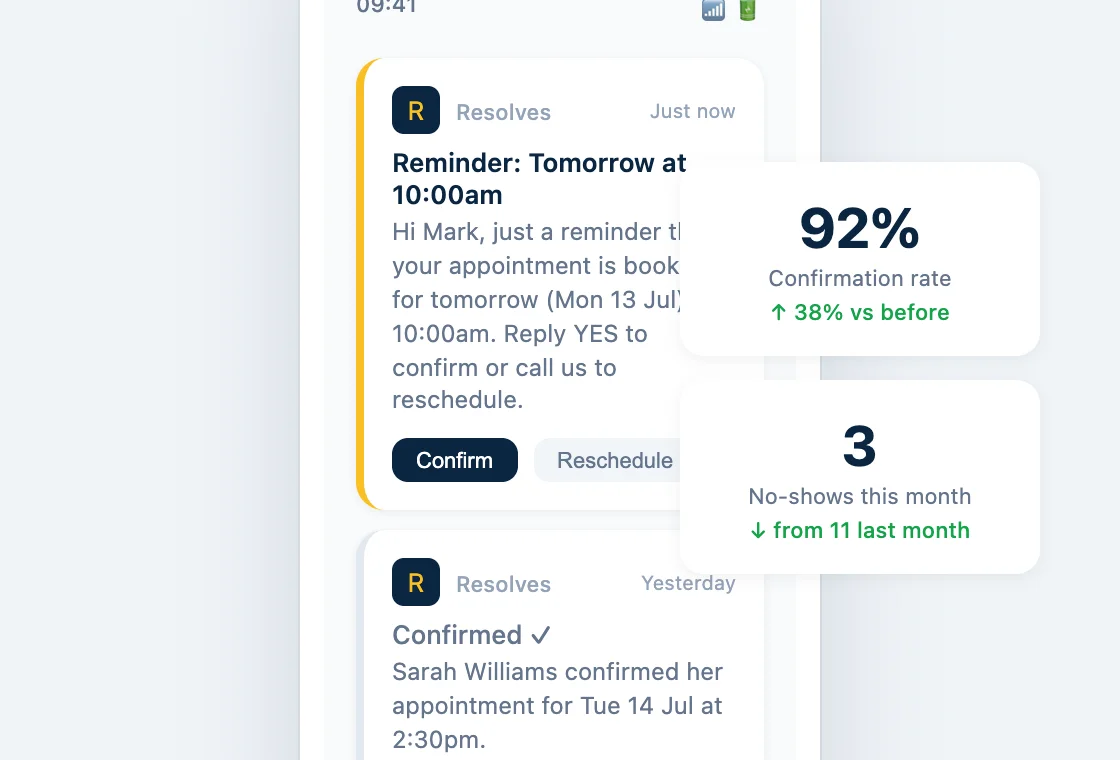
No-shows leave holes in your diary — and your takings
A customer books in for Tuesday morning. Tuesday arrives — no customer. The slot sits empty, you've turned other work away to keep it free, and you're left ringing round trying to fill the gap.
Most no-shows aren't customers messing you about. They booked a week ago, life got busy, and it slipped their mind. That makes them almost entirely preventable — a well-timed reminder is usually all it takes.
Resolves sends every customer an automatic text 24 hours before their appointment and again 2 hours before. They reply to confirm, reschedule, or cancel — so you know exactly who's turning up, and you get enough warning to fill the slots that free up.
How appointment reminders work
1
Customer books in
A job goes in the diary — booked online, over the phone, or on the doorstep. The reminders are scheduled automatically from that moment.
2
Reminders go out
24 hours before the appointment, the customer gets a friendly text. A second nudge lands 2 hours before — no chance of it slipping their mind.
3
They reply, you know
The customer replies to confirm, reschedule, or cancel. You see it instantly — and if a slot opens up, you've got time to fill it.
Without reminders
- Customers forget and simply don't turn up
- Empty slots you turned other work away to protect
- You find out someone's not coming when they don't show
- Evenings spent ringing round to confirm tomorrow's jobs
- No record of who confirmed and who cancelled
With Resolves
- Every customer reminded 24 hours and 2 hours before
- Cancellations come in early enough to fill the gap
- A quick reply tells you exactly who's turning up
- Confirmations happen automatically while you work
- Every confirmation, reschedule, and cancellation logged
Why trades use appointment reminders
📅
Fewer no-shows
Most no-shows are forgetfulness, not flakiness. Two well-timed texts cut them by up to 40%.
⏳
Fill cancelled slots
When someone cancels by reply, you find out hours in advance — not when the doorbell doesn't ring.
📞
No manual ring-arounds
Stop spending your evenings confirming tomorrow's diary. The reminders go out on their own, every time.
🔧
Works for any appointment
Quotes, site visits, installs, services, callbacks — if it goes in the diary, it gets a reminder.
🔁
Reschedule, not just cancel
Customers who can't make it can pick a new time by reply — so the job moves instead of disappearing.
⭐
Looks professional
A tidy reminder from your business name gives customers big-company confidence in a local trade.
Appointment reminder FAQs
How do appointment reminders work?
Every appointment in your diary automatically triggers two SMS reminders — one 24 hours before and one 2 hours before. The customer replies to confirm, reschedule, or cancel, and you see their response straight away.
Can customers reschedule by replying to the text?
Yes. If a customer can't make it, they can reschedule with a quick reply rather than just cancelling — so the job moves to a new slot instead of disappearing from your diary.
Do reminders go out by SMS or email?
Both. SMS is the default because texts get read within minutes, and email reminders can be added alongside for customers who prefer them.
Do I need new software or an app to run this?
No. We set everything up for you and it runs quietly in the background. You don't need to learn a new system, install an app, or press anything — reminders just go out.
Which plans include appointment reminders?
Appointment Reminders are included in our Growth and Scale plans. See the pricing page for the full breakdown of what each plan includes.
How quickly can I be up and running?
Typically within 48 hours of your free audit. We configure the reminders, agree the wording with you, and connect them to your bookings — then they run automatically.